
Depreciation
Depreciation spreads an asset's cost across its working life, so the register shows what things are worth now rather than what they cost when new.
Fisetra handles this in three parts, under Depreciation in the sidebar:
| Screen | Purpose |
|---|---|
| Depreciation Settings | Company-wide rules |
| Depreciation Template | Reusable rule sets applied to assets |
| Depreciation Report | Calculated results by period |
What depreciation reads from an asset
Before any of this works, the asset's Purchase tab must be complete:
| Field | Role |
|---|---|
| Acquisition value | What is being depreciated |
| Depreciation start date | When it begins — often later than the purchase date |
| Useful life | Over how long |
| Residual value | What remains at the end |
An asset missing these will not depreciate. That is the most common cause of a blank depreciation figure. See Managing assets.
Depreciation Settings
Requires the capability to view or update depreciation configuration.
Settings apply company-wide and decide how calculations behave.
Depreciation type
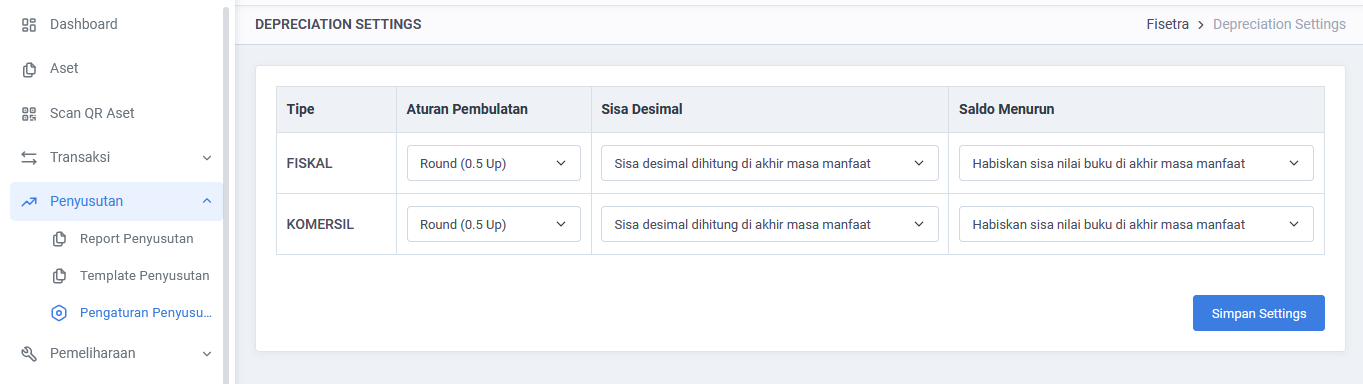
Fisetra distinguishes Fiscal from Commercial depreciation, so the same asset can be depreciated one way for tax purposes and another for management reporting.
If your organisation does not make that distinction, use one and be consistent.
Rounding
| Setting | Effect |
|---|---|
| Rounding rule | How fractional amounts are rounded: banker's rounding, half up, always up, always down |
| Decimal adjustment | Where the accumulated rounding difference is absorbed — in December, or at end of life |
Rounding sounds trivial and is not. Over a long life, a fraction of a currency unit per month accumulates, and the adjustment rule decides where that lands. Match it to what your accountants expect.
Depreciation Template
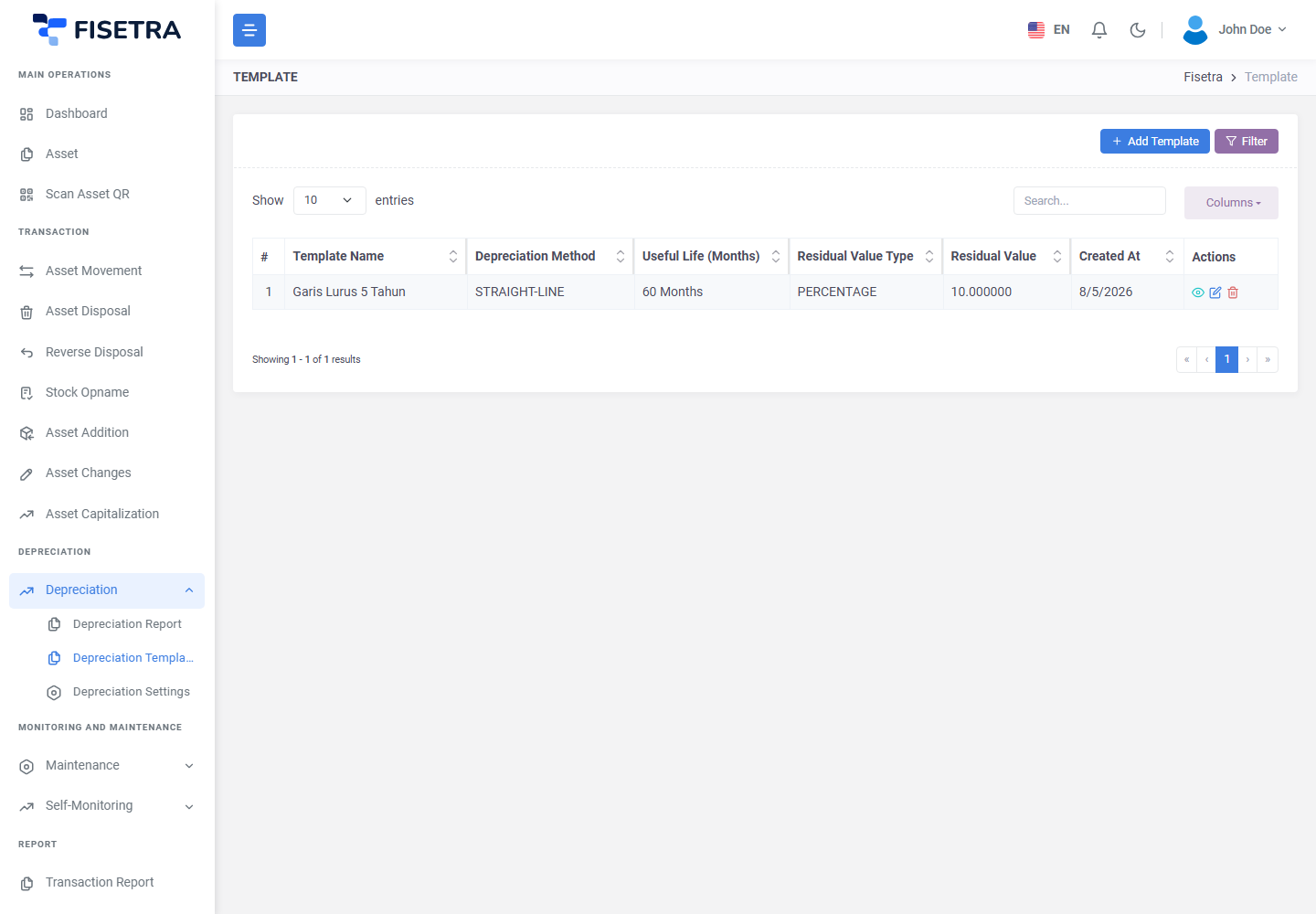
A template is a reusable set of depreciation rules applied to many assets, so a policy is defined once rather than per asset.
Methods
| Method | How it behaves | Suits |
|---|---|---|
| Straight-line | The same amount every period | Assets that wear evenly — furniture, buildings |
| Declining balance | A percentage of the remaining value, so more early and less later | Assets that lose value fastest when new — vehicles, IT equipment |
Straight-line
Depreciation per year = (Acquisition value − Residual value) ÷ Useful life
Book value            = Acquisition value − Accumulated depreciation
Declining balance
Depreciation = Book value at start of period × Declining factor
Book value   = Book value at start of period − Depreciation
Because it applies a percentage to a shrinking balance, declining balance never quite reaches zero on its own. The declining balance policy decides how it ends:
| Policy | Effect |
|---|---|
| Switch to straight-line | Switches method partway so the asset finishes cleanly |
| Force residual at end | Forces the final value to the residual value |
| No adjustment | Leaves it as the formula produces |
Residual value
Residual value is set either as a percentage of the acquisition value or as a fixed amount. Percentage suits a policy applied across a class of assets; fixed suits a known resale value.
Creating a template
- Open Depreciation → Depreciation Template.
- Select the create option.
- Give it a name and code.
- Choose the method, the default useful life and the residual value.
- For declining balance, set the factor and the end policy.
- Save.
Templates can be assigned to many assets at once, which is far quicker than setting each asset individually.
Running a calculation
- Create a period
- Preview the result
- Run the calculation
- Review the report
- Open Depreciation → Depreciation Report.
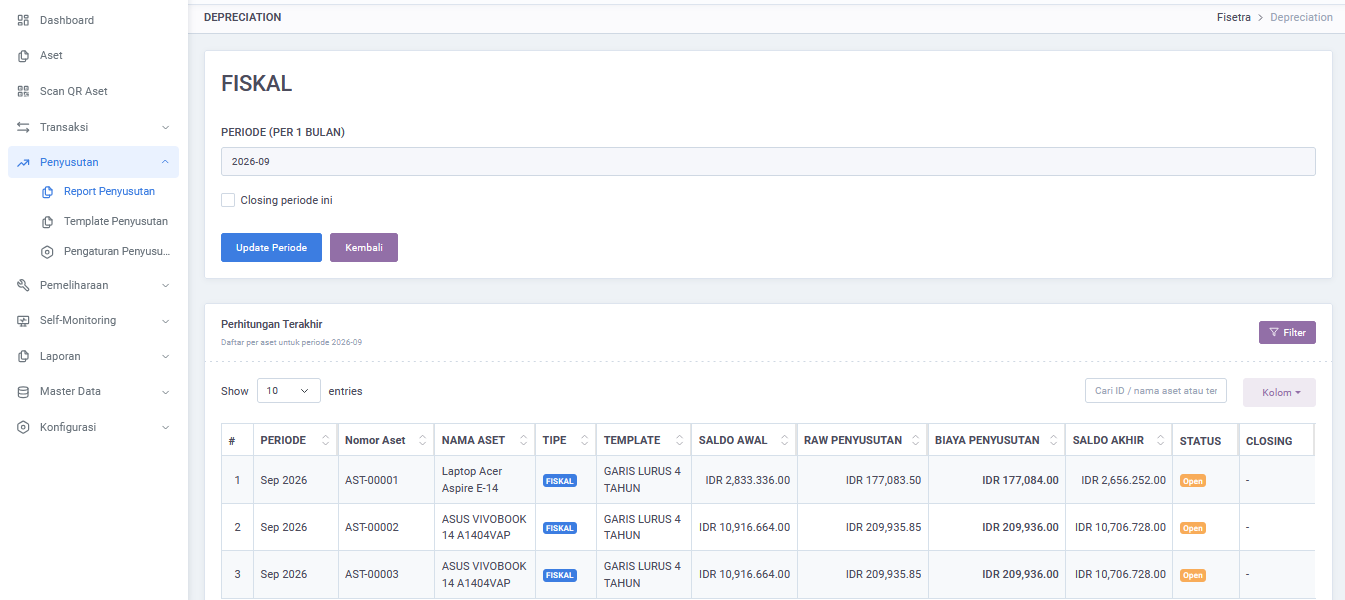
- Create a period — the month or year to calculate.
- Preview the calculation to see the figures before committing them.
- Run it. Fisetra calculates each eligible asset and records the charge and the new book value.
- Large calculations run in the background.
Preview first. It is much easier to spot a wrong template before the numbers are written than to explain them afterwards.
The report
The report shows, per period and per asset, the depreciation charged, the accumulated total and the current book value, filterable by period, category, location and department, and exportable — see Reports.
Each asset also has its own Depreciation tab showing only its own figures.
Depreciation and other transactions
| Event | Effect |
|---|---|
| Disposal | Depreciation stops. The last depreciation date on the document decides where |
| Reverse disposal | Depreciation resumes — review the dates afterwards |
| Capitalization | Later periods use the higher value and any extended life. Earlier periods are not recalculated |
| Asset changes on purchase values | Changes the basis from that point on |
Common problems
| Problem | Why | What to do |
|---|---|---|
| An asset shows no depreciation | Purchase fields incomplete, no template assigned, or the start date is in the future | Check the asset's Purchase tab, then its template |
| Figures differ from your own calculation | Rounding rule, residual type or method differs from your assumption | Compare against Depreciation Settings and the template |
| Declining balance never reaches residual | That is how the method behaves | Set an end policy on the template |
| A disposed asset is still depreciating | The last depreciation date on the disposal was set later than expected | Check the disposal document |
| Capitalization did not change past periods | It applies going forward only | Expected |
| A calculation seems stuck | Large runs are processed in the background | Wait, then refresh; if it never finishes, contact your system administrator |